Keep what your business has already built
Ultineo E-commerce takes in a shop that already sells, with its catalogue and its sales history. Ultineo SaaS builds software around the processes you already run and Ultineo Reasoning launches AI reasoning from your own tools: three separate products, each with its own access.
What matters when your business already runs
- Nothing starts from zero
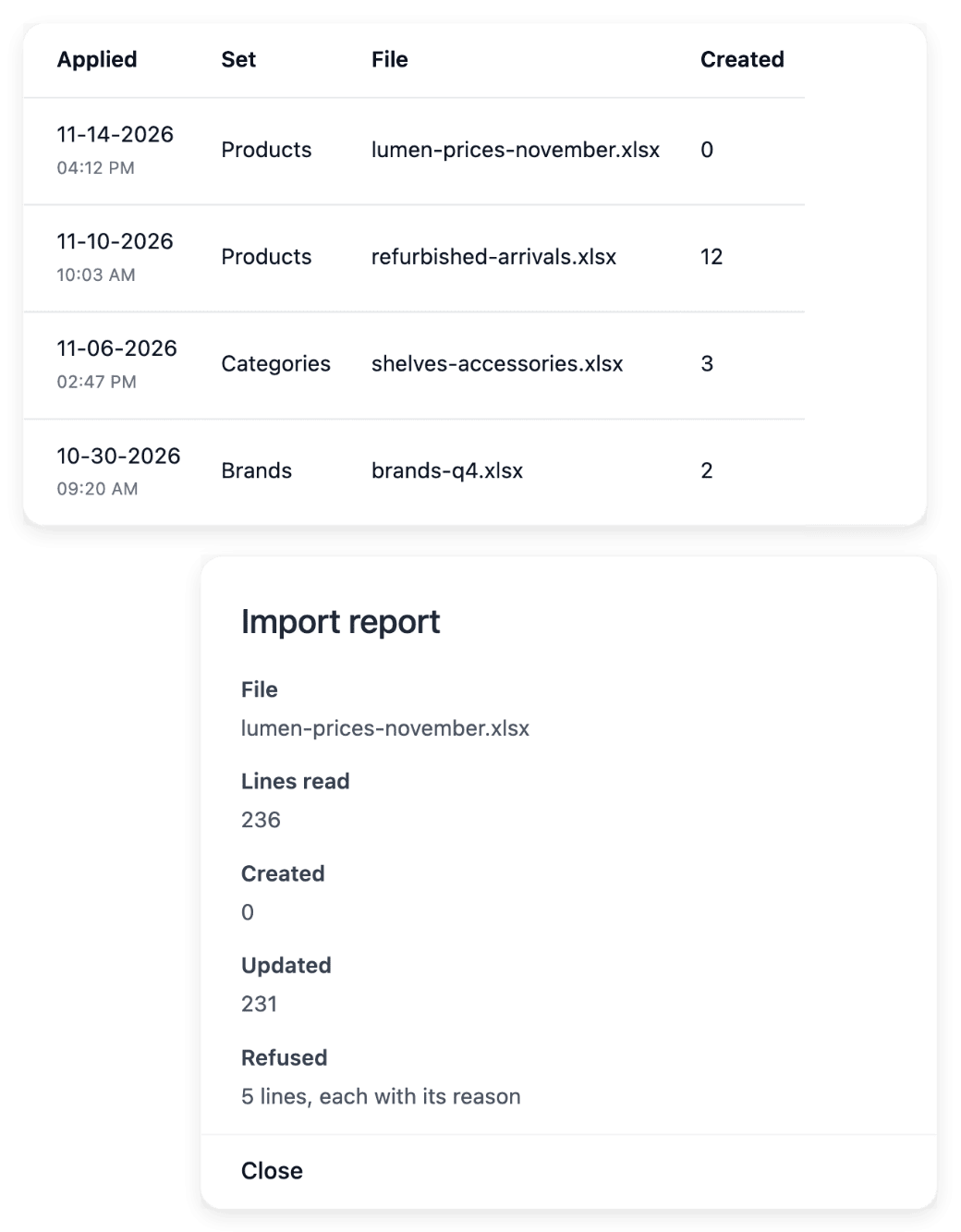
Your catalogue, your customers and your past orders already exist somewhere, and the business cannot leave them behind. Catalogue data moves in as spreadsheets, with a report for every line, and the E-commerce API imports a sales history with its original dates.
- Several markets to read
A business that sells in several countries has to see what each one brings before deciding where to put its effort. Statistics shows your sales by product, country, payment method and promotion over the period you choose, and you add each country you can deliver to, with no limit on their number.
- Live work to protect
Customers and colleagues rely every day on what already works, so a change cannot be tried out on them. You can test an import before anything is written, and a software project keeps development, staging and production apart: production serves the version you want your users to rely on.
What an established business takes on next
- Move the shop you already run
Bring the catalogue from files and the sales history through the API. Allo Allo, the example shop of this site, existed before it moved, and its customers, its orders and its support requests came with it.
- Open more countries
Activate a country for your shop, then prepare its delivery zones, its rates, its payment methods and the content its buyers will read.
- Build software around your processes
Bring the process your team already knows: the people involved, the information they exchange and the decisions they make. You review the proposed scope and the complete offer before construction.
- Put AI into your own software
Add a reasoning step to an existing screen: a summary, a suggested reply, a classification. One call launches the run with its fields, another reads it back with its answer.
How an established business moves in
-
1
Present what you run today In your application for a shop, say that you want to move your store or to discuss using Ultineo at scale, with your volumes, your markets and your growth plans. For software, choose what you want to build, for instance a replacement for software you use today, and say how many people will use it.
-
2
Prepare access and connections Once your shop is open, an administrator of its project creates an API key in the workspace, on the API Access tab. In a software project, declare the external services the application has to use.
-
3
Run a trial first To test an import, send it as a dry run: you get the full report of what would be created, updated, left unchanged or refused, and nothing is written. In a software project, make staging available, confirm its version and test the complete task.
-
4
Import, publish and check Import the catalogue first, then the sales history, and read records back to check what was saved. In a software project, publish the release you tested, then verify its version and the user journey in production.
Connect your shop to the systems you already run
The E-commerce API lets your own tools fill your shop and read it back: an ERP sync or a supplier feed sends records in batches, then reads any single record back to check what was saved. Its reference covers the catalogue, the sales history and vouchers. Each key is created with full or restricted access, and a restricted key is limited, resource by resource, to reading or to reading and writing.
No connector is installed for you: your technical team or your service provider builds and tests the exchange against the documented endpoints. Each resource is read back one record at a time, with no list and no search, and you should not assume that every screen of the workspace has an equivalent endpoint.
Connect your software to the services you already use
In a software project, a connection starts with the name of the external service and its documentation: you explain which business action requires it and the information that should move between the systems. The declaration keeps test and production access details separate, since they can belong to different provider accounts. A declared connection can then be linked to more than one business area.
Declaring a service supplies the requirements of the integration; it does not prove that the workflow works, so test the complete exchange in the relevant environment before you rely on it in production. Describe too the response you expect when the service is unavailable.
The capabilities behind it
- External connections
Describe the external service to connect, provide its documentation and associate it with the relevant business areas.
- Countries, languages & currencies
Sell across countries and languages
- Statistics
Sales reports by product and market
- Development, staging and production
Use separate environments to build, test a selected version and run the application for users.
- Optional project API
Review an API scope for an eligible project and distinguish planned routes from the endpoints already built.
- API
Run your reasoning from any software.
Go further
- Ultineo E-commerce
- Ultineo SaaS
- Ultineo Reasoning
Tell us what your business runs today
Each product has its own start: an application for a shop or for software, a first exchange with our team for reasoning.
Questions
No. They are three separate products, each with its own access and its own pricing page. A shop account and a software project are each opened after an application reviewed by our team. For reasoning, there is no self-service account: our team opens your access after a first exchange.
A shop account is opened for a business that has been operating for at least six months and whose products can be shipped and delivered to at least three countries. A business that delivers in one country only does not meet that second condition. A software project asks for a defined business need and a budget that matches one of the published offers.
Through a project API, which is an option of a project and not a part of every application. Its availability and its price appear in the offer of the project, it exposes the operations agreed for that project, and an application can operate without it. A planned route is not a working endpoint: inspect the route catalogue of the activated project before you start an integration.
Through the reasoning API, which runs your reasoning from any software: it exchanges JSON over HTTPS and authenticates every call with a project key. A key is tied to one project and can never read or write the data of another project. Our team opens your project and hands you its first key.