Hand a recurring task to AI in the tools you already use
Ultineo Reasoning turns a task into an application that brings together your instructions and the fields to fill in. You launch it on screen or from your software through the API, and each run keeps its answer for you to read and check.
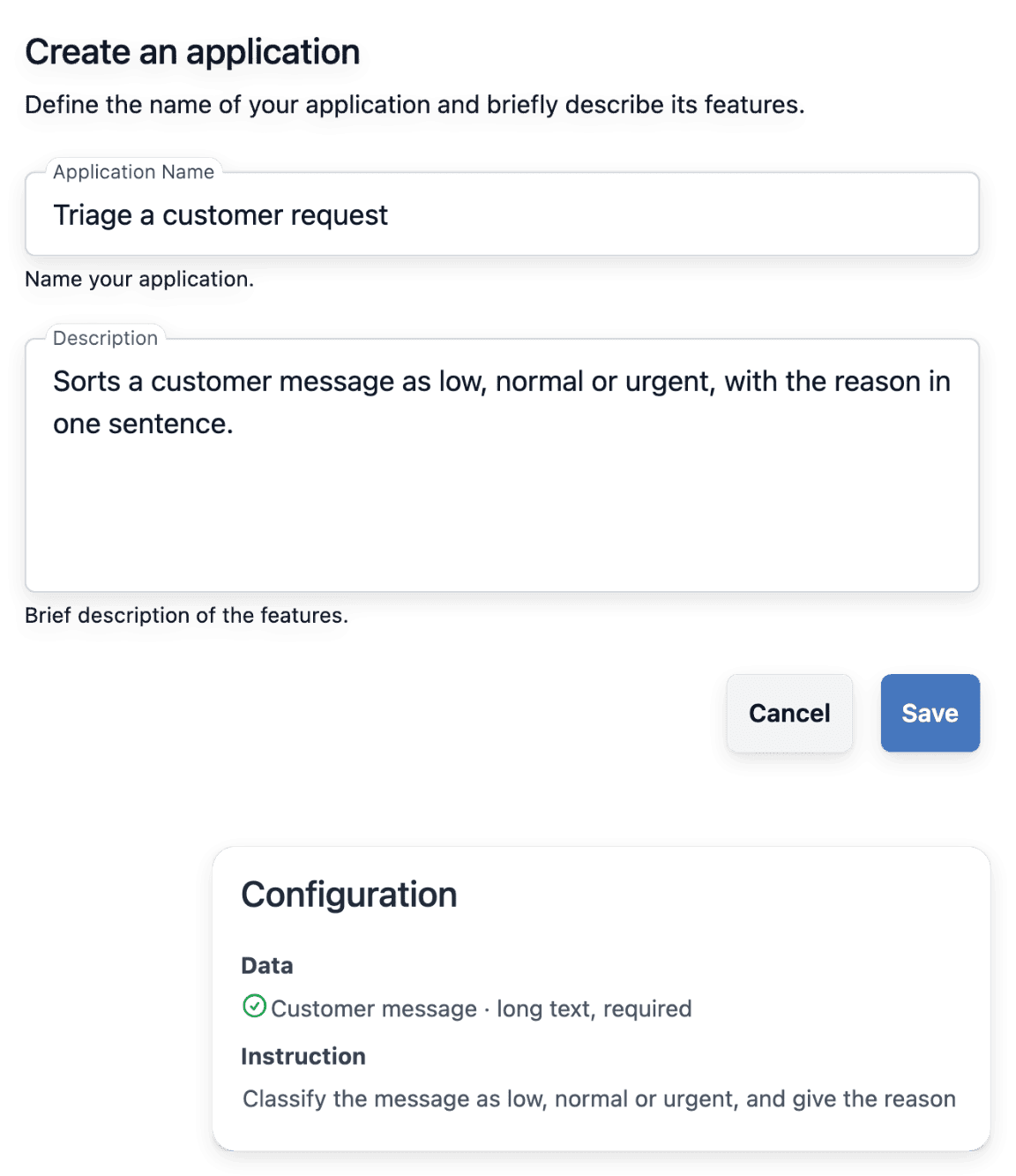
What stands between AI and your daily work
- Instructions typed again each time
In a chat tool, someone explains the task again at every request, and the answer changes with the wording. In Ultineo Reasoning, you define the instructions of an application once: they describe its role, what it must produce and in what form, and they apply to every run, identically.
- Outside the tools you use
Copying a message into another window, then pasting the answer back, adds a handling step to every request. The API launches a run from your software, your website or your internal tools, and your software displays the answer, stores it or passes it on.
- Answers nobody can trace
An answer given in a conversation is hard to find again, and harder to compare with what was asked. Each run keeps its fields, its answer and its duration, so you can read back what was sent and what came out.
Go further into this use case
- AI for shop content
Launch focused AI tasks for missing descriptions, search texts, translations and photos, then review.
- AI inside your software
A reasoning step added to a screen of your own software, launched through the API and read back.
How handing over a recurring task works
-
1
Tell us the task Describe one task you repeat and the software to connect. We show you the application that handles it, then our team opens your project.
-
2
Create the application In your workspace, give the application a name, its instructions and its fields. Each field has a name the API uses as is, so the same application runs on screen and from your software.
-
3
Launch a run Fill in the fields on screen, or let your software send the application’s identifier and one value per field. In a chain, the answer goes on to the next step, according to the conditions you set.
-
4
Read and check the answer Every finished run shows its exact duration. Read the answer next to the fields that were sent, and check that it has the form your instructions ask for.
Turn a task you repeat into an application
An application does one task: it takes a few fields, follows its instructions and returns a structured answer. You give it a name, write what it must produce and in what form, and define the fields to fill in, such as a customer’s request, notes, a document or an image. Filling in the fields is then enough to launch a run, on screen or through the API.
A run is queued and handled in turn, then moves to finished, or to failed if it could not complete; you can then run the application again with the same fields. How long a run takes depends on the length of the fields, the answer requested and the queue.
Link the steps of a task in one launch
A chain puts several applications in sequence: each step passes its answer to the next, and conditions decide the path. One step summarizes a customer’s request, a condition tests whether the answer contains a word such as “urgent”, and another step drafts a reply ready for review. Each application keeps its own instructions and its own fields.
The chain starts on demand, when you launch it, and stops where a condition is not met and its branch leads nowhere. After a launch you see the path taken, step by step, with the answer of each one.
Run your reasoning from the software you already use
The API adds a reasoning step to an existing screen of your software: a summary, a suggested reply, a classification. A script or an automation tool can also launch a run at each event, such as a form received or a file dropped. Any software able to send an HTTPS request can run an application.
Through the API, a run is asynchronous: one call creates it, and your software reads it back until it is finished or failed. Every call is authenticated with a project key, which reaches only the data of its own project and carries scopes, an optional expiry and a status you can disable.
Start from a ready-made application of the catalogue
The catalogue brings together ready-made reasoning steps, arranged by family and by trade. Each card opens the application: what it does and the fields it asks for. You run an application as it is, or use it as a step of one of your chains.
The catalogue never shows the instructions of an application, which belong to its owner. You keep an application you create private, or publish it to the catalogue with its visual and its category.
The capabilities behind it
- How it works
From the application to the answer, step by step.
- Reasoning chains
Several applications in sequence, with conditions.
- API
Run your reasoning from any software.
- Application catalogue
Ready-made applications for 40 trades.
Go further
- Ultineo Reasoning
Start with one task you repeat every day
Tell us the tasks to hand over and the software to connect, and our team opens your access.
Questions
Not to create an application or draw a chain: it is all done in your workspace, where you place the blocks of a chain on a canvas and connect their outputs, without code. The API is for teams that want to run their reasoning from their own software.
The one its instructions describe, for example summarizing a request, classifying a message or drafting a reply. Attach a document to a field and the application works on its text; it also reads an image, such as a scanned page, a photo or a screenshot. When a task takes several steps, a chain gives each step its own application, one to sort and another to write.
A finished run keeps its answer, in the form your instructions ask for, with its duration and its usage. In a chain, each step is a run in its own right: you see what each one received and answered. Reading and checking the answer stays with you: in the example chain, the reply is drafted ready for review.
No. Ultineo E-commerce has its own AI tasks for the content of a shop: they generate missing descriptions and search texts, translate content and standardize product photos. Ultineo Reasoning is a separate product, with its own access, in which you write your own applications and chain them. Its API can launch a run from your business software, your shop or your automations.
Ultineo Reasoning has no self-service account. Write to us and choose Reasoning, with the tasks to hand over, the software to connect and the expected volume: our team opens your project and your access to the applications and the API. The pricing page states how usage is billed.