Ultineo AI
AI applications built for the work of your trade
Ultineo AI, the AI line of Ultineo, brings together ready-made applications for 40 trades. Each one turns the few fields you fill in into a document, a summary, a classification or a reply you can use straight away.
One application for each job, ready to run
- Organized by trade
Applications are grouped into 40 trades, so a clinic, a law firm or a building contractor finds the jobs it actually does.
- The same clear result every time
Each application asks for the fields it needs and returns its answer in the same structured shape, run after run.
- From your own software too
The Ultineo AI API launches the same applications from your own tools, with one key per project.
Five families, forty trades
The catalogue follows the trade you work in. Open a family to see its trades, then a trade to see the jobs its applications take on.
- Health and people
Care, wellbeing, teaching and teams.
- Professional services
Advice, finance, property and public service.
- Commerce and hospitality
Selling, hosting guests, events and customer service.
- Industry and field work
Building, making, moving and maintaining.
- Media, culture and communication
Creating, publishing, broadcasting and connecting people.
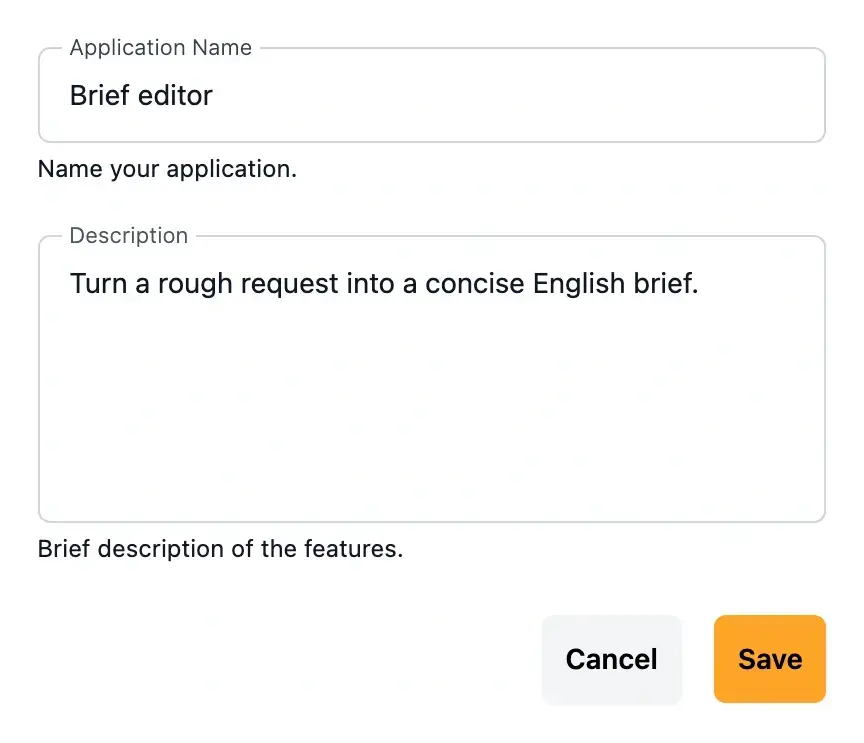
Each application does one job well
An application has a name, a short description, the input fields it asks for and the instructions that shape its answer. You fill in the fields, for example your consultation notes or a client enquiry, and the application returns its result.
The instructions belong to the application and are never shown to the people who run it. Only the input fields are, because they are what a caller fills in.
What happens when an application runs
- The run is queued
Launching an application creates a run with the inputs you supplied. It starts in the new status and is picked up in turn.
- The answer is written
The run moves to processing while the answer is produced, then to finished, or to failed if it could not complete.
- Usage is measured
Each finished run keeps its answer, its duration and the tokens it used, so your usage is counted run by run.
Run the same applications from your software
- One key per project
A project key authenticates each call and only reaches the data of its own project.
- The catalogue with its fields
List the published applications and read the input fields each one expects before you launch it.
- Runs you can follow
Create a run, then read it back until it is finished and its answer is filled in.
How access to Ultineo AI works
- Tell us your trade
Write to us with the AI line selected: your trade, the jobs you want to hand over and the volume you expect.
- We open your project
Our team opens your Ultineo AI project with the applications you need and the plan that fits your usage.
- Run and follow your usage
Your project key launches runs from your own software, and each run counts against the allowance of your plan.
Put AI to work on your trade
Tell us which jobs to hand over and we will open your access to Ultineo AI.
Questions about Ultineo AI
Not yet. Ultineo AI has no self-service sign-up: write to us with the AI line selected and our team opens your access.
No. An application asks for a few fields in plain words and returns its answer. The API is there for teams who want to run applications from their own software.
In the Ultineo AI catalogue, by family and by trade. Each trade page describes the jobs its applications take on.
By plan. Each plan includes a monthly usage allowance, a number of applications you can customize and a priority level. API access comes with the paid plans.
Yes. Ultineo AI has its own pricing, its own access and its own contact choice, separate from E-commerce and Vibe coding.